AbstractSequentialSystem#
- class optika.systems.AbstractSequentialSystem[source]#
Bases:
AbstractSystemAn interface describing a sequential optical system.
A sequential optical system is a system where the ordering of the optical surfaces is known in advance.
Attributes
The logical axes of
grid_inputcorresponding to changing field coordinate.Normalized version of
axis_field.The logical axes of
grid_inputcorresponding to changing pupil coordinate.Normalized version of
axis_pupil.The name of the logical axis representing the sequence of surfaces.
The logical axis of
grid_inputcorresponding to changing wavelength.Normalized version of
axis_wavelength.The upper right corner of this optical system's field of view.
The lower left corner of this optical system's field of view.
The field stop surface.
The input grid to sample with rays.
The index of the field stop in
surfaces_all.The index of the pupil stop in
surfaces_all.Extra keyword arguments that will be used in the call to
named_arrays.plt.plot()within theplot()method.The external object being imaged or illuminated by this system.
A boolean flag indicating if the object is at infinity.
The upper right corner of this optical system's entrance pupil in physical units.
The lower left corner of this optical system's entrance pupil in physical units.
The pupil stop surface.
Computes the rays in local coordinates at the last surface in the system as a function of input wavelength and position using
grid_input.A rayfunction defined on the input surface of the optical system, which is designed to exactly strike the borders of both the field stop and the pupil stop.
The imaging sensor that measures the light captured by this system.
The array shape of this object.
A sequence of surfaces representing this optical system.
Concatenate
objectwithsurfacesinto a single list of surfaces.the coordinate transformation between the global coordinate system and this object's local coordinate system
Methods
__init__()area_effective([wavelength, field, pupil, ...])Estimate the wavelength-dependent effective area of this system by tracing rays through it.
distortion([wavelength, field, pupil, ...])Fit a polynomial distortion model to the rays traced through this system.
image(scene[, pupil, axis_wavelength, ...])Forward model of the optical system.
plot([ax, transformation, components, ...])Plot the surfaces of the system and the default raytrace.
rayfunction([intensity, wavelength, field, ...])Given the wavelength, field position, and pupil position of some input rays, trace those rays through the system and return the resulting rays in local coordinates of the sensor (if it exists).
raytrace([intensity, wavelength, field, ...])Given the wavelength, field position, and pupil position of some input rays, trace those rays through the system and return the result in global coordinates, optionally including all intermediate rays.
spot_diagram([figsize, s, cmap])Create a spot diagram of the rays at each field point to inspect the performance of this optical system.
to_dxf(file, unit[, transformation])to_string([prefix])Public-facing version of the
__repr__method that allows for defining a prefix string, which can be used to calculate how much whitespace to add to the beginning of each line of the result.vignetting([wavelength, field, pupil, ...])Fit a polynomial vignetting model to the rays traced through this system.
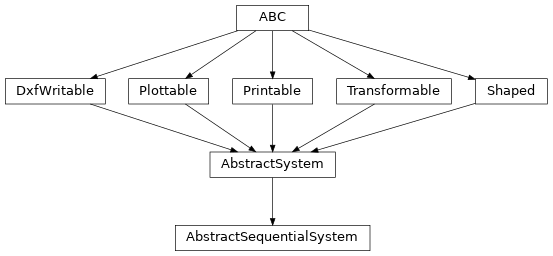
Inheritance Diagram
- area_effective(wavelength=None, field=None, pupil=None, normalized_field=True, normalized_pupil=True)[source]#
Estimate the wavelength-dependent effective area of this system by tracing rays through it.
For each wavelength and field position, rays are traced across the pupil and the throughput of each ray (the product of the efficiency of every surface it encounters: reflectivity, transmissivity, diffraction efficiency, and the absorbance of the sensor) is weighted by the area of its pupil cell and summed, giving the effective area at that field position. Rays blocked by an aperture are excluded from the sum. The result is then averaged over the field of view and returned as an
InterpolatedEffectiveAreaModel, which linearly interpolates in wavelength.The components of pupil are interpreted as the vertices of a grid of cells, and the rays are traced at the corresponding cell centers, so that each ray can be weighted by the physical area of its cell.
The throughput includes the absorbance of the sensor but not its charge collection efficiency, which is applied separately, so this is the effective area up to the absorption of photons in the detector.
If the object is at infinity, the pupil is measured in units of length and the effective area has units of area (such as \(cm^2\)). If the object is at a finite distance, the pupil is measured in units of angle and the result instead has units of solid angle (such as \(deg^2\)).
- Parameters:
wavelength (None | Quantity | AbstractScalar) – The wavelengths at which to evaluate the effective area, which must vary along a single logical axis. If
None(the default),self.grid_input.wavelengthwill be used.field (None | AbstractCartesian2dVectorArray) – The field positions at which the effective area is sampled before averaging over the field of view, in either normalized or physical units. If
None(the default),self.grid_input.fieldwill be used.pupil (None | AbstractCartesian2dVectorArray) – The vertices of the pupil grid, in either normalized or physical units. The area of each pupil cell is computed from these vertices and used to weight the throughput, and the rays are traced at the cell centers. If
None(the default), an \(11 \times 11\) grid spanning the normalized pupil is used.normalized_field (bool) – A boolean flag indicating whether the field parameter is given in normalized or physical units.
normalized_pupil (bool) – A boolean flag indicating whether the pupil parameter is given in normalized or physical units.
- Raises:
ValueError – If the wavelength grid does not vary along a single logical axis.
- Return type:
- distortion(wavelength=None, field=None, pupil=None, normalized_field=True, normalized_pupil=True, degree=2)[source]#
Fit a polynomial distortion model to the rays traced through this system.
- Parameters:
wavelength (None | Quantity | AbstractScalar) – The wavelengths of the input rays. If
None(the default),self.grid_input.wavelengthwill be used.field (None | AbstractCartesian2dVectorArray) – The field positions of the input rays, in either normalized or physical units. If
None(the default),self.grid_input.fieldwill be used.pupil (None | AbstractCartesian2dVectorArray) – The pupil positions of the input rays, in either normalized or physical units. If
None(the default),self.grid_input.pupilwill be used.normalized_field (bool) – A boolean flag indicating whether the field parameter is given in normalized or physical units.
normalized_pupil (bool) – A boolean flag indicating whether the pupil parameter is given in normalized or physical units.
degree (int) – The degree of the polynomial distortion model.
- Return type:
- image(scene, pupil=None, axis_wavelength=None, axis_field=None, axis_pupil=None, integrate=True, noise=True)[source]#
Forward model of the optical system. Maps the given spectral radiance of a scene to detector counts.
- Parameters:
scene (FunctionArray[SpectralPositionalVectorArray, AbstractScalar]) – The spectral radiance of the scene as a function of wavelength and field position. The inputs must be cell vertices.
pupil (None | AbstractCartesian2dVectorArray) – The vertices of the pupil grid in either normalized or physical coordinates. If
None(the default), the pupil grid will only have one cell.axis_wavelength (None | str) – The logical axis of scene corresponding to changing wavelength coordinate. If
None,set(scene.inputs.wavelength.shape) - set(self.shape), should have only one element.axis_field (None | tuple[str, str]) – The two logical axes of scene corresponding to changing field coordinate. If
None,set(scene.inputs.position.shape) - set(self.shape) - {axis_wavelength}, should have exactly two elements.axis_pupil (None | tuple[str, str]) – The two logical axes of pupil corresponding to changing pupil coordinate. If
None,set(pupil.shape) - set(self.shape) - {axis_wavelength,} - set(axis_field), should have exactly two elements. If pupil isNone, this parameter is ignored.integrate (bool) – Whether to integrate the wavelength axis. Real images usually have the wavelength axis integrated since they use a black/white sensor, but it can be useful to leave the wavelengths separate for introspective purposes.
noise (bool) – Whether to add noise to the result.
- Return type:
FunctionArray[SpectralPositionalVectorArray, AbstractScalar]
- plot(ax=None, transformation=None, components=None, plot_rays=True, plot_rays_vignetted=False, kwargs_rays=None, **kwargs)[source]#
Plot the surfaces of the system and the default raytrace.
- Parameters:
ax (None | Axes | ScalarArray[ndarray[tuple[Any, ...], dtype[_ScalarT]]]) – The matplotlib axes on which to plot the system
transformation (None | AbstractTransformation) – Any additional transformation to apply to the system before plotting.
components (None | tuple[str, ...]) – The vector components to plot if ax is 2-dimensional.
plot_rays (bool) – Boolean flag indicating whether to plot the rays.
plot_rays_vignetted (bool) – Boolean flag indicating whether to plot the vignetted rays.
kwargs_rays (None | dict[str, Any]) – Any additional keyword arguments to use when plotting the rays.
kwargs – Any additional keyword arguments to use when plotting the surfaces.
- Return type:
- rayfunction(intensity=None, wavelength=None, field=None, pupil=None, normalized_field=True, normalized_pupil=True)[source]#
Given the wavelength, field position, and pupil position of some input rays, trace those rays through the system and return the resulting rays in local coordinates of the sensor (if it exists).
- Parameters:
intensity (None | float | Quantity | AbstractScalar) – The energy density of the input rays.
wavelength (None | Quantity | AbstractScalar) – The wavelengths of the input rays. If
None(the default),self.grid_input.wavelengthwill be used.field (None | AbstractCartesian2dVectorArray) – The field positions of the input rays, in either normalized or physical units. If
None(the default),self.grid_input.fieldwill be used.pupil (None | AbstractCartesian2dVectorArray) – The pupil positions of the input rays, in either normalized or physical units. If
None(the default),self.grid_input.pupilwill be used.normalized_field (bool) – A boolean flag indicating whether the field parameter is given in normalized or physical units.
normalized_pupil (bool) – A boolean flag indicating whether the pupil parameter is given in normalized or physical units.
- Return type:
See also
raytraceSimilar to rayfunction except it can compute all the intermediate rays, and it returns results in global coordinates.
- raytrace(intensity=None, wavelength=None, field=None, pupil=None, axis=None, normalized_field=True, normalized_pupil=True, accumulate=True)[source]#
Given the wavelength, field position, and pupil position of some input rays, trace those rays through the system and return the result in global coordinates, optionally including all intermediate rays.
- Parameters:
intensity (None | float | Quantity | AbstractScalar) – The energy density of the input rays.
wavelength (None | Quantity | AbstractScalar) – The wavelengths of the input rays. If
None(the default),self.grid_input.wavelengthwill be used.field (None | AbstractCartesian2dVectorArray) – The field positions of the input rays, in either normalized or physical units. If
None(the default),self.grid_input.fieldwill be used.pupil (None | AbstractCartesian2dVectorArray) – The pupil positions of the input rays, in either normalized or physical units. If
None(the default),self.grid_input.pupilwill be used.axis (None | str) – The axis along which the rays are accumulated. If
None(the default),axis_surfacewill be used.normalized_field (bool) – A boolean flag indicating whether the field parameter is given in normalized or physical units.
normalized_pupil (bool) – A boolean flag indicating whether the pupil parameter is given in normalized or physical units.
accumulate (bool) – Whether to include intermediate rays in the result.
- Return type:
See also
rayfunctionSimilar to raytrace except it only returns the rays at the last surface in local coordinates.
- spot_diagram(figsize=(8, 6), s=5, cmap=None)[source]#
Create a spot diagram of the rays at each field point to inspect the performance of this optical system.
- to_dxf(file, unit, transformation=None)#
- Parameters:
file (Path)
unit (Unit)
transformation (None | AbstractTransformation)
- to_string(prefix=None)#
Public-facing version of the
__repr__method that allows for defining a prefix string, which can be used to calculate how much whitespace to add to the beginning of each line of the result.
- vignetting(wavelength=None, field=None, pupil=None, normalized_field=True, normalized_pupil=True, degree=2)[source]#
Fit a polynomial vignetting model to the rays traced through this system.
The relative illumination at each scene coordinate is estimated from the fraction of unvignetted rays in the pupil, normalized so that its average over the field of view is unity. Field points with no unvignetted rays are excluded from the fit and from the normalization.
- Parameters:
wavelength (None | Quantity | AbstractScalar) – The wavelengths of the input rays. If
None(the default),self.grid_input.wavelengthwill be used.field (None | AbstractCartesian2dVectorArray) – The field positions of the input rays, in either normalized or physical units. If
None(the default),self.grid_input.fieldwill be used.pupil (None | AbstractCartesian2dVectorArray) – The pupil positions of the input rays, in either normalized or physical units. If
None(the default),self.grid_input.pupilwill be used.normalized_field (bool) – A boolean flag indicating whether the field parameter is given in normalized or physical units.
normalized_pupil (bool) – A boolean flag indicating whether the pupil parameter is given in normalized or physical units.
degree (int) – The degree of the polynomial vignetting model.
- Return type:
- abstract property axis_field: None | tuple[str, str]#
The logical axes of
grid_inputcorresponding to changing field coordinate.If
None(the default),grid_input.fieldshould have only two axes other than those inshapeandaxis_wavelength.
- property axis_field_: tuple[str, str]#
Normalized version of
axis_field.
- abstract property axis_pupil: None | tuple[str, str]#
The logical axes of
grid_inputcorresponding to changing pupil coordinate.If
None(the default),grid_input.pupilshould have only two axes other than those inshape,axis_wavelength, andaxis_field.
- property axis_pupil_: tuple[str, str]#
Normalized version of
axis_pupil.
- abstract property axis_surface: str#
The name of the logical axis representing the sequence of surfaces.
- abstract property axis_wavelength: None | str#
The logical axis of
grid_inputcorresponding to changing wavelength.If
None(the default),grid_input.wavelengthshould have at most one logical axis other than the axes inshape.
- property axis_wavelength_: tuple[str, ...]#
Normalized version of
axis_wavelength.An empty
tupleifgrid_input.wavelengthdoes not vary along its own logical axis.
- property field_max: AbstractCartesian2dVectorArray#
The upper right corner of this optical system’s field of view.
- property field_min: AbstractCartesian2dVectorArray#
The lower left corner of this optical system’s field of view.
- property field_stop: AbstractSurface#
The field stop surface.
- abstract property grid_input: ObjectVectorArray#
The input grid to sample with rays.
This grid is simultaneously projected onto both the field stop and the pupil stop.
Positions on the stop can be specified in either absolute or normalized coordinates. Using normalized coordinates allows for injecting different grid types (cylindrical, stratified random, etc.) without specifying the scale of the stop surface.
If positions are specified in absolute units, they are measured in the coordinate system of the corresponding stop surface.
- property index_field_stop: int#
The index of the field stop in
surfaces_all.
- property index_pupil_stop: int#
The index of the pupil stop in
surfaces_all.
- abstract property kwargs_plot: None | dict#
Extra keyword arguments that will be used in the call to
named_arrays.plt.plot()within theplot()method.
- abstract property object: AbstractSurface#
The external object being imaged or illuminated by this system.
If
None, the external object is assumed to be at infinity.
- property object_is_at_infinity: bool#
A boolean flag indicating if the object is at infinity.
If
objectdoesn’t have an aperture, it is assumed that the object is at infinity.
- property pupil_max#
The upper right corner of this optical system’s entrance pupil in physical units.
- property pupil_min: AbstractCartesian2dVectorArray#
The lower left corner of this optical system’s entrance pupil in physical units.
- property pupil_stop: AbstractSurface#
The pupil stop surface.
- property rayfunction_default: RayFunctionArray#
Computes the rays in local coordinates at the last surface in the system as a function of input wavelength and position using
grid_input.This property is cached to increase performance. If
grid_inputis updated, the cache must be cleared withdel system.rayfunction_defaultbefore calling this property.
- property rayfunction_stops: RayFunctionArray#
A rayfunction defined on the input surface of the optical system, which is designed to exactly strike the borders of both the field stop and the pupil stop.
- abstract property sensor: None | AbstractImagingSensor#
The imaging sensor that measures the light captured by this system.
This is the last surface in the optical system.
- abstract property surfaces: Sequence[AbstractSurface]#
A sequence of surfaces representing this optical system.
At least one of these surfaces needs to be marked as the pupil surface, and if the object surface is not marked as the field stop, one of these surfaces needs to be marked as the field stop.
- property surfaces_all: list[AbstractSurface]#
Concatenate
objectwithsurfacesinto a single list of surfaces.
- abstract property transformation: None | AbstractTransformation#
the coordinate transformation between the global coordinate system and this object’s local coordinate system