Prime Focus Telescope Tutorial#
The prime focus telescope
is one of the simplest telescope designs since it has only one reflection and no
obscuration surfaces (ignoring the small obscuration from the sensor).
It works by placing a sensor at the focus of a parabolic primary mirror.
This tutorial will demonstrate how to model a prime focus telescope using
optika and investigate its performance
[1]:
import matplotlib.pyplot as plt
import astropy.units as u
import astropy.visualization
import named_arrays as na
import optika
Primary mirror#
We’ll start by defining the primary mirror aperture radius
[2]:
radius_aperture = 100 * u.mm
and the \(f\)-number of the primary mirror
[3]:
f_number = 5
So the focal length of the primary is then
[4]:
focal_length = f_number * radius_aperture
focal_length
[4]:
We can specify a parabolic sag profile for our primary mirror using the optika.sags.ParabolicSag class
[5]:
sag_primary = optika.sags.ParabolicSag(-focal_length)
For simplicity, we will consider the primary mirror to be a perfectly-reflective mirror,
which we can reprsent with optika.materials.Mirror.
[6]:
To specify a circular apeture for our primary mirror, we can use optika.apertures.CircularAperture.
[7]:
aperture_primary = optika.apertures.CircularAperture(radius_aperture)
Finally, we can specify the position and orientation of the primary mirror using the
named_arrays.transformations module.
To translate the primary mirror one focal length away from the origin, we use named_arrays.transformations.Cartesian3dTranslation.
[8]:
translation_primary = na.transformations.Cartesian3dTranslation(z=focal_length)
We can combine the sag profile, aperture shape, material type, and coordinate transformation into one object to represent the primary mirror,
an instance of optika.surfaces.Surface.
[9]:
primary = optika.surfaces.Surface(
    name="primary",
    sag=sag_primary,
    material=material_primary,
    aperture=aperture_primary,
    transformation=translation_primary,
    is_pupil_stop=True,
)
The is_pupil_stop=True statement in the previous cell sets the primary mirror as the pupil stop,
the surface that controls the size of the entrance pupil.
Sensor#
If the size of each pixel in the sensor is
[10]:
width_pixel = 15 * u.um
The number of pixels along each axis is
[11]:
num_pixel = na.Cartesian2dVectorArray(256, 256)
The name of each axis of the pixel array is
[12]:
axis_pixel = na.Cartesian2dVectorArray("detector_x", "detector_y")
In optika, the surface normal should be antiparallel to the incident light.
To accomplish this the sensor needs to be rotated 180 degrees.
[13]:
rotation_sensor = na.transformations.Cartesian3dRotationY(180 * u.deg)
Putting it all together, we can represent the sensor using optika.sensors.ImagingSensor
[14]:
sensor = optika.sensors.ImagingSensor(
    name="sensor",
    width_pixel=width_pixel,
    axis_pixel=axis_pixel,
    num_pixel=num_pixel,
    transformation=rotation_sensor,
    is_field_stop=True,
)
The is_field_stop=True statement in the previous cell sets the sensor as the field stop,
the surface that controls the size of the field of view
Input rays#
The position and direction of the input rays is specified in terms of normalized coordinates. We can specify a uniform normlized pupil grid withSS
[15]:
pupil = na.Cartesian2dVectorLinearSpace(
    start=-1,
    stop=1,
    axis=na.Cartesian2dVectorArray("px", "py"),
    num=5,
    centers=True,
)
a normalized field grid with
[16]:
field = na.Cartesian2dVectorLinearSpace(
    start=-1,
    stop=1,
    axis=na.Cartesian2dVectorArray("fx", "fy"),
    num=5,
    centers=True,
)
and assume a constant wavelength
[17]:
wavelength = 500 * u.nm
optika provides a vector type for representing a point in wavelength/field/pupil space,
optika.vectors.ObjectVectorArray
[18]:
grid_input = optika.vectors.ObjectVectorArray(
    wavelength=wavelength,
    field=field,
    pupil=pupil,
)
Building the system#
optika.systems.SequentialSystem
is a composition of the optical surfaces and the input ray grid.
[19]:
system = optika.systems.SequentialSystem(
    surfaces=[
        primary,
    ],
    sensor=sensor,
    grid_input=grid_input,
)
We can plot the system using the optika.systems.SequentialSystem.plot() method.
[20]:
# plot the system
with astropy.visualization.quantity_support():
    fig, ax = plt.subplots(constrained_layout=True)
    ax.set_aspect("equal")
    system.plot(
        ax=ax,
        components=("z", "y"),
        kwargs_rays=dict(
            color="tab:blue",
        ),
        color="black",
        zorder=10,
    )

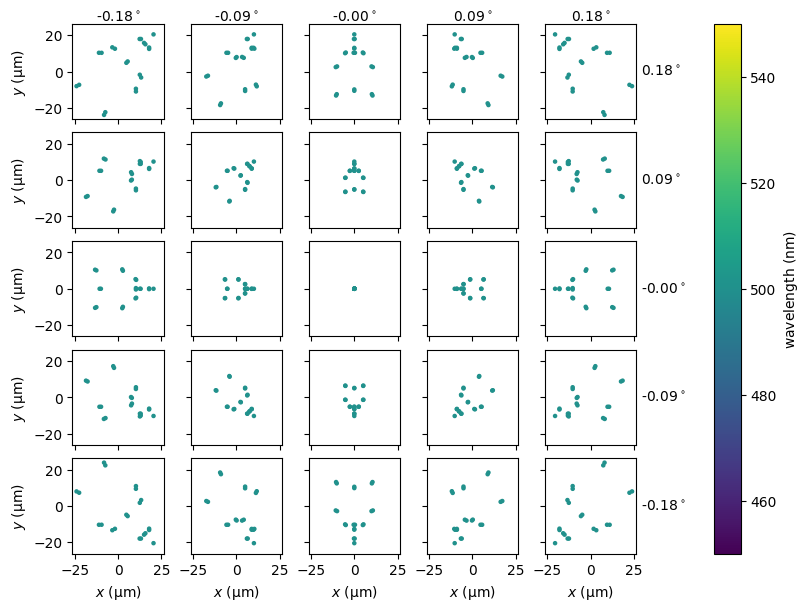
Spot Diagrams#
We can plot a spot diagram for each field angle using the
spot_diagram() method of
SequentialSystem.
[21]:
fig, ax = system.spot_diagram()