CircularSectorAperture#
- class optika.apertures.CircularSectorAperture(radius=<Quantity 0. mm>, angle_start=<Quantity 0. deg>, angle_stop=<Quantity 180. deg>, *, samples_wire=101, active=True, inverted=False, transformation=None, kwargs_plot=None)[source]#
Bases:
AbstractApertureA circular sector aperture.
Examples
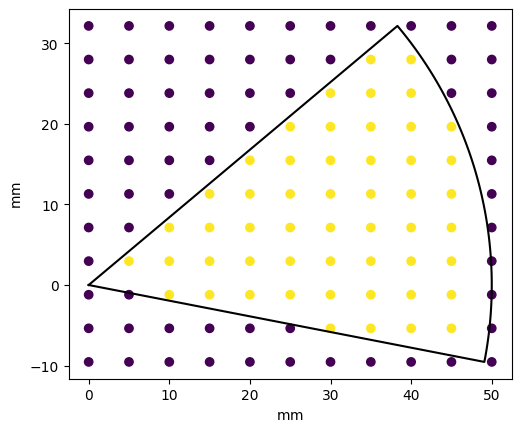
Plot a single circular aperture sector
import matplotlib.pyplot as plt
import astropy.units as u
import astropy.visualization
import named_arrays as na
import optika

# Define a circular aperture sector
aperture = optika.apertures.CircularSectorAperture(
    radius=50 * u.mm,
    angle_start=-11 * u.deg,
    angle_stop=40 * u.deg,
)

# Define points to sample the aperture with
points = na.Cartesian3dVectorLinearSpace(
    start=aperture.bound_lower,
    stop=aperture.bound_upper,
    axis=na.Cartesian3dVectorArray("x", "y", "z"),
    num=na.Cartesian3dVectorArray(11, 11, 1),
)

# Compute which points are inside the aperture
where = aperture(points)

# Plot the circular aperture sector
with astropy.visualization.quantity_support():
    plt.figure()
    plt.gca().set_aspect("equal")
    aperture.plot(components=("x", "y"), color="black")
    na.plt.scatter(
        points.x,
        points.y,
        c=where.astype(float)
    )
Attributes
Whether the aperture is active and can clip rays.
The starting angle of the circular sector.
The ending angle of the circular sector.
The lower-left corner of the aperture's rectangular footprint in surface coordinates.
The upper-right corner of the aperture's rectangular footprint in surface coordinates.
Whether this object is being used as an aperture or obscuration.
Extra keyword arguments that will be used in the call to
named_arrays.plt.plot()within theplot()method.The radius of the cirucular sector.
The default number of samples used for
wire().The array shape of this object.
The transformation between the local surface coordinates and the aperture.
Methods
__init__([radius, angle_start, angle_stop, ...])clip_rays(rays)Given a set of input rays in surface coordinates, update the
unvignettedto beFalseif the ray is blocked by the aperture.plot([ax, transformation, components, sag])Plot the selected components onto the given axes.
to_dxf(file, unit[, transformation])to_string([prefix])Public-facing version of the
__repr__method that allows for defining a prefix string, which can be used to calculate how much whitespace to add to the beginning of each line of the result.wire([num])A sequence of points representing this aperture in surface coordinates.
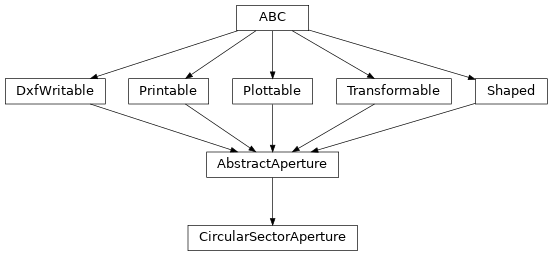
Inheritance Diagram
- Parameters:
radius (Quantity | AbstractScalar)
angle_start (Quantity | AbstractScalar)
angle_stop (Quantity | AbstractScalar)
samples_wire (int)
active (bool | AbstractScalar)
inverted (bool | AbstractScalar)
transformation (None | AbstractTransformation)
kwargs_plot (None | dict)
- clip_rays(rays)#
Given a set of input rays in surface coordinates, update the
unvignettedto beFalseif the ray is blocked by the aperture.- Parameters:
rays (RayVectorArray) – The input rays to clip.
- plot(ax=None, transformation=None, components=None, sag=None, **kwargs)#
Plot the selected components onto the given axes.
- Parameters:
ax (None | Axes | ScalarArray[ndarray[tuple[Any, ...], dtype[_ScalarT]]]) – The matplotlib axes to plot onto
transformation (None | AbstractTransformation) – Any extra transformations to apply to the coordinate system before plotting
components (None | tuple[str, ...]) – Which 3d components to plot, helpful if plotting in 2d.
kwargs – Additional keyword arguments that will be passed along to
named_arrays.plt.plot()sag (None | AbstractSag)
- Return type:
None | ScalarArray[ndarray[tuple[Any, …], dtype[None | Line2D]]]
- to_dxf(file, unit, transformation=None)#
- Parameters:
file (Path)
unit (Unit)
transformation (None | AbstractTransformation)
- to_string(prefix=None)#
Public-facing version of the
__repr__method that allows for defining a prefix string, which can be used to calculate how much whitespace to add to the beginning of each line of the result.
- wire(num=None)[source]#
A sequence of points representing this aperture in surface coordinates.
- Parameters:
num (None | int) – The total number of samples that will be used to represent this wire.
- Return type:
- active: bool | AbstractScalar = True#
Whether the aperture is active and can clip rays.
- angle_start: Quantity | AbstractScalar = <Quantity 0. deg>#
The starting angle of the circular sector. Must be between \(-2 \pi\) and \(+2 \pi\) radians.
- angle_stop: Quantity | AbstractScalar = <Quantity 180. deg>#
The ending angle of the circular sector. Must be between \(-2 \pi\) and \(+2 \pi\) radians and counterclockwise from angle_start.
- property bound_lower: Cartesian3dVectorArray#
The lower-left corner of the aperture’s rectangular footprint in surface coordinates.
- property bound_upper: Cartesian3dVectorArray#
The upper-right corner of the aperture’s rectangular footprint in surface coordinates.
- inverted: bool | AbstractScalar = False#
Whether this object is being used as an aperture or obscuration.
If
True, the interior of the aperture allows light to passthrough. IfFalse, the exterior of the aperture allows light to pass through.
- kwargs_plot: None | dict = None#
Extra keyword arguments that will be used in the call to
named_arrays.plt.plot()within theplot()method.
- radius: Quantity | AbstractScalar = <Quantity 0. mm>#
The radius of the cirucular sector.
- transformation: None | AbstractTransformation = None#
The transformation between the local surface coordinates and the aperture.