AbstractSurface#
- class optika.surfaces.AbstractSurface[source]#
Bases:
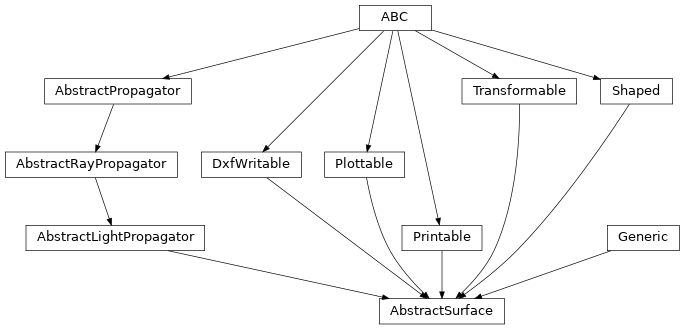
DxfWritable,Plottable,Printable,Transformable,Shaped,AbstractLightPropagator,Generic[SagT,MaterialT,ApertureT,ApertureMechanicalT,RulingsT]Interface describing a single optical interface.
Attributes
The region of this surface which allows light to propagate.
The shape of the physical substrate containing this optical surface.
A flag controlling whether this surface should act as the field stop for the system
A flag controlling whether this surface should act as the pupil stop for the system
If this surface is pupil stop or the field stop, return
True.Extra keyword arguments that will be used in the call to
named_arrays.plt.plot()within theplot()method.The optical material type of this surface.
The human-readable name of this surface.
The optional ruling profile of this surface.
The sag profile of this surface.
The array shape of this object.
the coordinate transformation between the global coordinate system and this object's local coordinate system
Methods
__init__()plot([ax, transformation, components])Plot the selected components onto the given axes.
propagate_rays(rays)Refract, reflect, and/or diffract the given rays off of this surface
to_dxf(file, unit[, transformation])to_string([prefix])Public-facing version of the
__repr__method that allows for defining a prefix string, which can be used to calculate how much whitespace to add to the beginning of each line of the result.Inheritance Diagram
- plot(ax=None, transformation=None, components=None, **kwargs)[source]#
Plot the selected components onto the given axes.
- Parameters:
ax (None | Axes | ScalarArray[ndarray[tuple[Any, ...], dtype[_ScalarT]]]) – The matplotlib axes to plot onto
transformation (None | AbstractTransformation) – Any extra transformations to apply to the coordinate system before plotting
components (None | tuple[str, ...]) – Which 3d components to plot, helpful if plotting in 2d.
kwargs – Additional keyword arguments that will be passed along to
named_arrays.plt.plot()
- Return type:
- propagate_rays(rays)[source]#
Refract, reflect, and/or diffract the given rays off of this surface
- Parameters:
rays (RayVectorArray) – A set of input rays that will interact with this surface.
- Return type:
- to_dxf(file, unit, transformation=None)#
- Parameters:
file (Path)
unit (Unit)
transformation (None | AbstractTransformation)
- to_string(prefix=None)#
Public-facing version of the
__repr__method that allows for defining a prefix string, which can be used to calculate how much whitespace to add to the beginning of each line of the result.
- abstract property aperture: ApertureT#
The region of this surface which allows light to propagate.
- abstract property aperture_mechanical: ApertureMechanicalT#
The shape of the physical substrate containing this optical surface.
- abstract property is_field_stop: bool#
A flag controlling whether this surface should act as the field stop for the system
- abstract property is_pupil_stop: bool#
A flag controlling whether this surface should act as the pupil stop for the system
- abstract property kwargs_plot: None | dict#
Extra keyword arguments that will be used in the call to
named_arrays.plt.plot()within theplot()method.
- abstract property material: MaterialT#
The optical material type of this surface.
- abstract property rulings: RulingsT#
The optional ruling profile of this surface.
- abstract property sag: SagT#
The sag profile of this surface.
- abstract property transformation: None | AbstractTransformation#
the coordinate transformation between the global coordinate system and this object’s local coordinate system